Forgot your Windows 11 password? How you get back in depends on the type of account on the computer. This guide covers only the official methods — no third-party tools that tamper with the system.
In this article
Step 1: find out the account type
- Microsoft account: the sign-in screen shows an email address (Outlook, Hotmail or another) under the name.
- Local account: only a name appears, with no email.
- Work or school account: the corporate email appears, or the computer belongs to your company. In that case, contact IT support — only they can reset it.
Step 2: Microsoft account
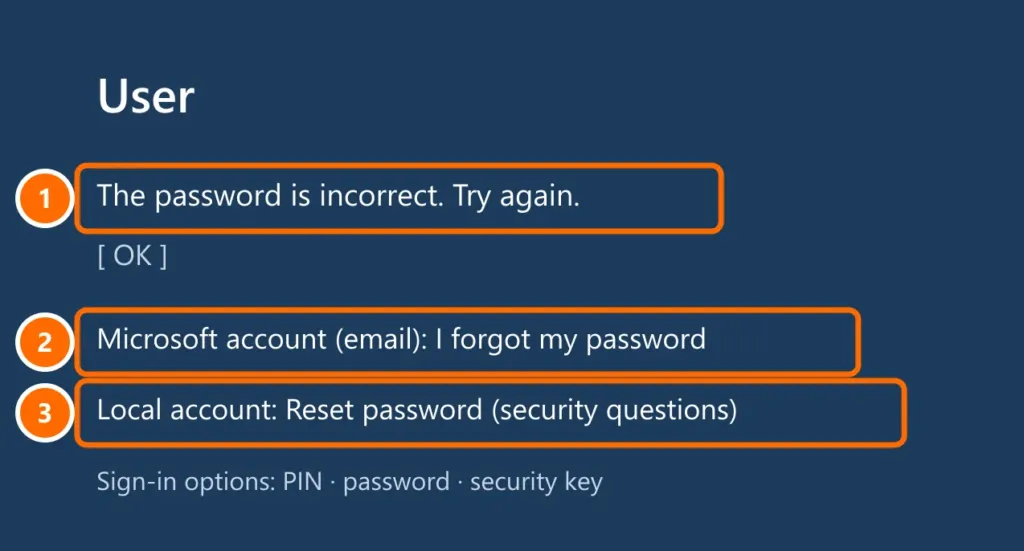
- On the sign-in screen, type any password to make the I forgot my password link appear, and click it.
- Verify your identity with the code sent to your recovery email or phone.
- Create the new password and sign in to Windows with it (the computer needs an internet connection).
You can also reset it from another device at account.live.com/password/reset. Then sign in to Windows with the new password.
Step 3: local account
- After a wrong password, click Reset password and answer the security questions you set up during Windows setup.
- If you created a password reset disk (USB drive), plug it in and follow the wizard.
- If there’s another administrator account on the computer, sign in with it and open Settings › Accounts › Other users; or right-click Start, open Computer Management › Local Users and Groups › Users, right-click your account and choose Set Password.
Step 4: last resort — reset the PC
If none of these options work, you can reinstall Windows from the sign-in screen. Personal files will be deleted if there’s no backup.
- On the sign-in screen, hold Shift and click Power › Restart.
- Choose Troubleshoot › Reset this PC and follow the instructions.
If the drive uses BitLocker, the reset may ask for the recovery key, which is usually saved in your Microsoft account at aka.ms/myrecoverykey.
So it doesn’t happen again
- Set up a PIN and Windows Hello as extra sign-in options.
- Keep your Microsoft account’s recovery email and phone up to date and turn on two-factor authentication.
- Store the password in a password manager.
FAQ
Is there a way to “crack” the Windows password?
Unofficial tools exist, but they modify system files and can be used to break into other people’s computers — so we don’t recommend them. The methods above solve it safely on a computer that’s yours.
I forgot my PIN but know the password.
On the sign-in screen, click I forgot my PIN, confirm your password and create a new PIN.
It’s a company computer asking for the domain password.
Only IT support can reset it. Many companies have a self-service password reset portal: ask IT.