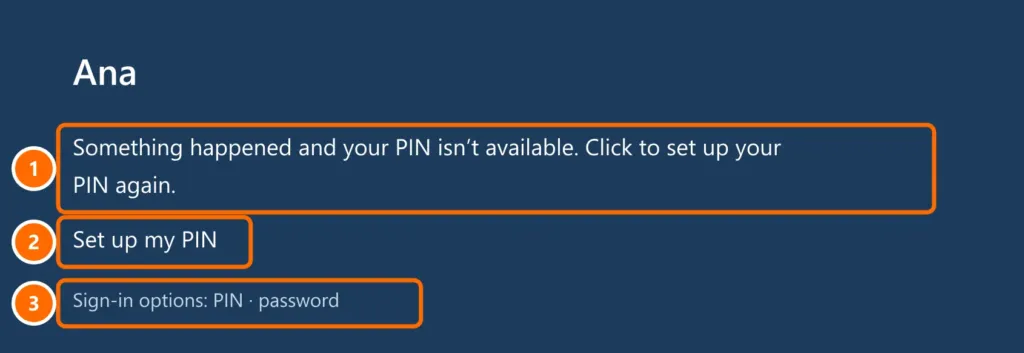
The sign-in screen shows “Something happened and your PIN isn’t available”, or face recognition and fingerprint stopped working? It usually happens after updates, hardware changes or a BIOS update. Your files are still there: just sign in another way and set up Windows Hello again.
In this article
Step 1: sign in another way
- Click Set up my PIN and follow the steps — you’ll confirm your identity with the account password (and, for a Microsoft account, a code).
- Or click Sign-in options and choose password.
If you don’t remember the password, see forgot your Windows 11 password.
Step 2: recreate the PIN in Settings
Once you’re in Windows:
- Open Settings › Accounts › Sign-in options.
- Under PIN (Windows Hello), click Remove and confirm with your password. Then click Set up and create a new PIN.
- If Remove is grayed out, first turn off For improved security, only allow Windows Hello sign-in for Microsoft accounts on this device, just below, and restart.
Step 3: face and fingerprint
- In Sign-in options, open Facial recognition or Fingerprint recognition, click Remove and set it up again.
- Update the infrared camera or fingerprint reader drivers from your laptop maker’s website. In Device Manager, they’re under Biometric devices.
- Clean the fingerprint reader and camera; damp hands or strong light behind you get in the way.
Step 4: after a BIOS update or motherboard change
The PIN is protected by the TPM chip. If the TPM was cleared or turned off (BIOS update, new motherboard), the old PIN no longer works. Check that the TPM is on — see Windows 11 requirements and TPM 2.0 — and recreate the PIN (step 2).
FAQ
Is a PIN less secure than a password?
No. The PIN is stored on the computer itself, protected by the TPM, and doesn’t work on any other device. A leaked password can be used from anywhere.
I forgot my PIN but know the password.
On the sign-in screen, click I forgot my PIN, confirm your password and create a new PIN.
Can I stop using a PIN?
Yes, if the option in step 2 (item 3) is turned off. But Windows Hello is more convenient and secure — it’s worth keeping.