Deleted an important file — or even emptied the Recycle Bin? There’s still a good chance to recover it, as long as you act quickly. Go through the options in order, from simplest to most advanced.
In this article
Option 1: Ctrl + Z and the Recycle Bin
- Just deleted it? Press Ctrl + Z in File Explorer.
- Open the Recycle Bin, right-click the file and choose Restore. It goes back to its original folder.
Option 2: OneDrive recycle bin
If the file was in a folder synced with OneDrive (Desktop, Documents and Pictures often are), go to onedrive.live.com › Recycle bin. Files stay there for 30 days on personal accounts (usually longer on work accounts).
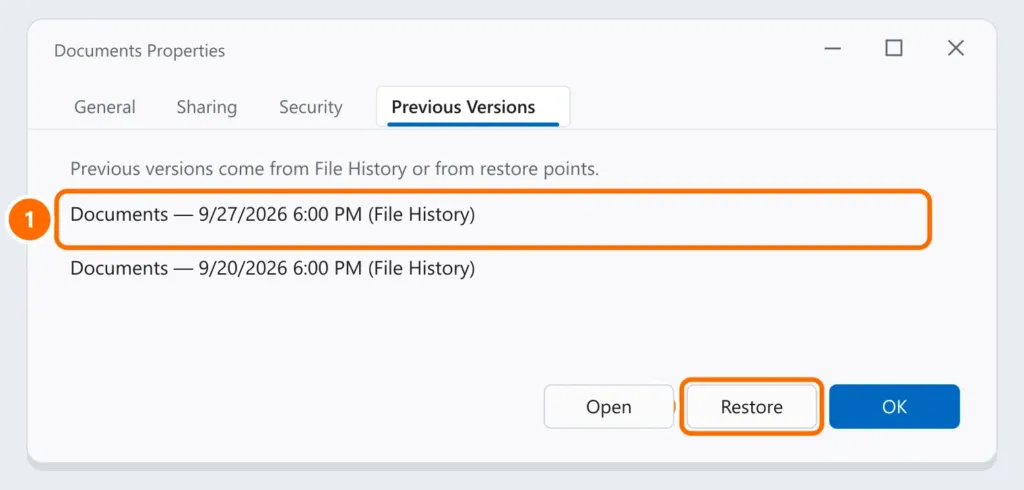
Option 3: Previous Versions
If File History or restore points were on:
- In File Explorer, right-click the folder where the file was and choose Properties.
- Open the Previous Versions tab, pick a date before the deletion and click Open to check it or Restore.
Option 4: Windows File Recovery (winfr)
This is Microsoft’s free, official tool for recovering deleted files from drives, USB flash drives and memory cards. Install Windows File Recovery from the Microsoft Store and run it in PowerShell as administrator.
Use another drive as the destination (a USB or external drive), never the same one the file was deleted from. Examples:
winfr C: E: /regular /n \Users\Ana\Documents\
winfr C: E: /extensive /n *.docx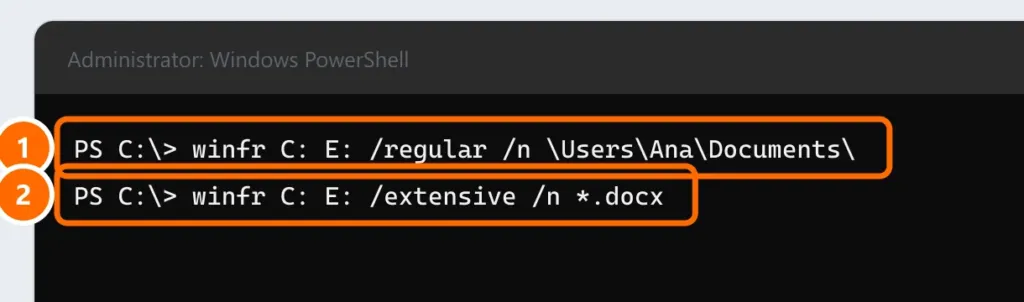
- /regular: for recently deleted files on an NTFS drive.
- /extensive: for older deletions, formatted drives or USB drives/cards (FAT/exFAT). Takes longer.
The tool creates a Recovery_ folder with the date on the destination drive, containing the files it found.
When to call a specialist
If the drive makes noise, isn’t detected or was physically damaged, turn it off and don’t try recovery software: every attempt can make it worse. Lab-based data recovery services are the option in those cases.
So you don’t depend on luck
Turn on File History or another backup routine — see the 3-2-1 backup rule.
FAQ
I deleted with Shift + Delete. Does it go to the Recycle Bin?
No. Files deleted with Shift + Delete skip the Recycle Bin. Use options 2 to 4.
Can I recover files from a formatted USB drive?
Often yes, with winfr’s /extensive mode, as long as nothing new was written to it.
The recovered files are corrupted.
Part of the file was already overwritten. Try another version (option 3) or another backup date.