RAM is where open programs live. When it runs out, Windows starts using the disk instead, and everything gets slow and freezes. In 2026, with Windows 11, a browser full of tabs, Teams or WhatsApp and AI features, the math has changed.
In this article
How much RAM for each use
| Use | Minimum | Recommended |
|---|---|---|
| Browser, email, Office, video calls, home use | 8 GB | 16 GB |
| Work with lots of tabs, Teams, large spreadsheets, several programs open | 16 GB | 16 GB |
| Current games | 16 GB | 16 to 32 GB |
| Video and photo editing, programming, virtual machines | 16 GB | 32 GB or more |
| AI running on the computer itself | 16 GB | 32 GB or more |
Bottom line: Windows 11 runs on 8 GB, but 16 GB is the comfortable minimum for anyone buying a computer today to use for several years.
How to tell if your PC is short on memory
- Press Ctrl + Shift + Esc to open Task Manager.
- Click Performance › Memory.
- Keep the programs you use every day open and watch In use.
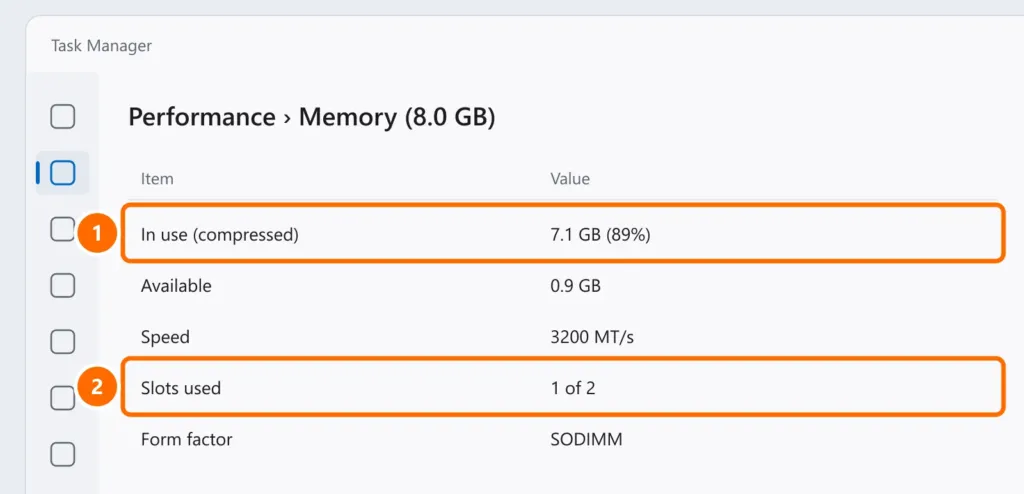
- Usage above 80% most of the time: you’re short on memory.
- Slots used: 1 of 2: there’s a free slot to add another stick.
- If there’s no Slots used line and the form factor isn’t SODIMM or DIMM, the memory may be soldered to the motherboard, common in thin laptops. In that case, you can’t add more.
Can you add more memory?
- Desktops: almost always yes.
- Laptops: it depends on the model. Many have a free slot; the thinnest ones have soldered memory. Check the manual or the manufacturer’s website with the exact model.
- Buy the same type (DDR4 or DDR5, SODIMM for laptops) and, ideally, the same speed as your current stick.
- Two identical sticks (2 × 8 GB) usually perform better than a single 16 GB stick, because they run in dual channel.
FAQ
Is 32 GB worth it for everyday use?
For browsing and Office, there’s no noticeable difference. It’s worth it for video editing, virtual machines or demanding games.
Can I mix an 8 GB stick with a 16 GB one?
It usually works, but part of the memory may run outside dual channel. Identical sticks are ideal.
Does more RAM make the internet faster?
No. If your internet is slow, see internet keeps dropping.