A laptop getting warm during a game or a video call is normal. The problem is when it gets hot while idle, the fan never stops, everything slows down or it shuts down on its own. A sudden shutdown is protection: the processor hit its maximum temperature and the laptop turns off to avoid damage.
In this article
Step 1: let the air flow
- Use the laptop on a hard, flat surface — a desk, not a bed, couch or blanket on your lap, which block the intake vents underneath.
- Make sure the exhaust vents (sides and back) aren’t against a wall or objects.
- A stand that raises the back improves airflow. A cooling pad helps a little, but won’t hurt.
Step 2: see what’s keeping the processor busy
Open Task Manager (Ctrl + Shift + Esc) and sort by the CPU column. If something stays high for no reason, fix that first: see high CPU usage with nothing open.
Step 3: adjust the power mode
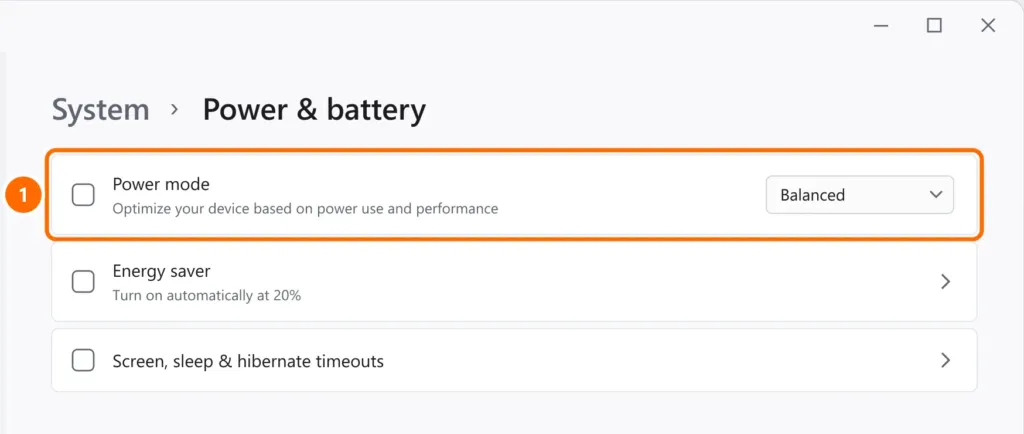
- Open Settings › System › Power & battery.
- Under Power mode, use Balanced day to day. Best performance keeps the processor boosted and runs hotter.
Many manufacturers also have a fan mode in their own app (Lenovo Vantage, MyASUS, Dell Power Manager, HP Command Center, Acer NitroSense): Balanced or Quiet reduces heat during light tasks.
Step 4: update the BIOS and drivers
BIOS updates often fix fan control and power management. Download them from your laptop maker’s website or app with the charger connected, and also update the chipset and graphics drivers.
Step 5: cleaning and servicing
Over time, dust clogs the heatsink and the thermal paste dries out. Signs: the fan is loud all the time and the laptop gets hot even when idle.
- With the laptop off and unplugged, blow compressed air through the vents in short bursts, holding the fan so it doesn’t overspin.
- Internal cleaning and new thermal paste require opening the laptop: on machines used for 2–3 years or more, it’s maintenance that usually fixes the problem for good.
FAQ
What temperature is normal?
Under heavy load, many laptop processors run between 80 °C and 95 °C (176–203 °F), close to the limit set by the manufacturer. During light use (browsing, documents), temperatures should drop well below that. Shutting down or freezing is the sign of a problem.
It gets hotter while charging.
It’s normal to run a bit warmer when plugged in, because the battery also produces heat. If it only overheats while charging, test with the original charger.
Can heat damage the laptop?
The shutdown protects the processor, but constant heat ages the battery faster. Fixing airflow extends the laptop’s life.