Every time you open a website, your browser talks to a server using the HTTP protocol. HTTPS adds the “S” for secure: the same conversation happens inside an encrypted connection. Today virtually every serious website uses HTTPS — and browsers warn you when one doesn’t.
In this article
The difference at a glance
| HTTP | HTTPS | |
|---|---|---|
| Encryption | No — data travels as plain text | Yes, with TLS |
| Default port | 80 | 443 |
| Digital certificate | Not used | Required |
| Browser indicator | “Not secure” | Padlock / site information icon |
| HTTP/2 and HTTP/3 support in browsers | No | Yes |
What HTTPS protects
HTTPS uses the TLS protocol to guarantee three things:
- Confidentiality: nobody in between (public Wi-Fi, your ISP, a compromised router) can read passwords, forms or page content.
- Integrity: data can’t be modified in transit — for example, to inject ads or malicious code.
- Authenticity: the certificate proves you’re connected to the server for the domain shown in the address bar.
How to check a site’s certificate
- Click the icon to the left of the address (padlock or site information icon).
- Open the connection and certificate details.
- Check which domain the certificate was issued for, who issued it and when it expires.
Types of certificate
| Type | What is validated | Common use |
|---|---|---|
| DV (domain validation) | Control of the domain only | Blogs, company websites, small stores |
| OV (organization validation) | Domain and that the company exists | Corporate websites |
| EV (extended validation) | Stricter verification of the company | Banks and large companies |
For encryption, all three are equivalent. Free DV certificates, such as those from Let’s Encrypt, are used by millions of websites and offered by most hosting providers.
How to enable HTTPS on your website
- Install the certificate from your hosting dashboard. Most hosts offer free SSL with automatic renewal.
- Redirect HTTP to HTTPS with a 301 redirect so visitors and search engines always land on the secure version.
- Fix mixed content: images, scripts or stylesheets loaded over
http://on an HTTPS page may be blocked by the browser. - Update internal links, your sitemap and your Google Search Console property to the
https://version. - Enable HSTS once everything is validated, so browsers always use HTTPS for your domain.
To check the redirect, use Command Prompt (in PowerShell, type curl.exe instead of curl):
curl -I http://yourwebsite.com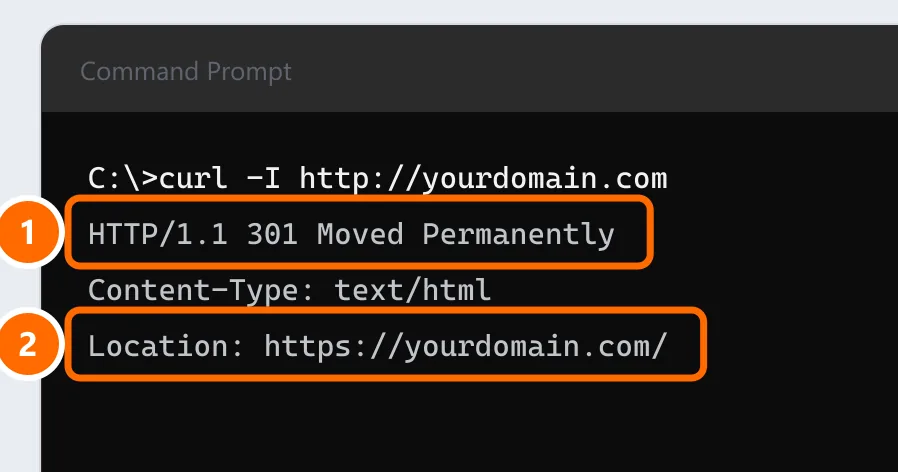
Does HTTPS affect Google rankings?
Yes, but only slightly. Google has used HTTPS as a lightweight ranking signal since 2014. The indirect effect is bigger: browsers label HTTP pages “Not secure”, which drives visitors away and hurts trust.
FAQ
Is an HTTP website dangerous?
For just reading public content, the risk is lower. But never enter passwords, personal or payment details on HTTP pages: everything travels unencrypted.
Is a free certificate less secure than a paid one?
No. The encryption is the same. Paid OV and EV certificates differ in how thoroughly the company is verified, plus support and commercial warranties.
Why does the browser say “Not secure” even with HTTPS?
Usually because of mixed content (resources loaded over HTTP), an expired certificate, or a certificate issued for a different domain.