The .pst file is where Outlook stores email, contacts and calendar on the computer itself. It’s common with POP accounts, archives and backups. Here’s where it is and how to look after it.
In this article
PST or OST?
| File | What it is | Does it need a backup? |
|---|---|---|
| .pst | Email lives only on the computer (POP accounts, archives, exports) | Yes — if the file is lost, the email is lost |
| .ost | A local copy of a Microsoft 365, Exchange or IMAP account | No — the original is on the server and Outlook rebuilds the file |
Where the file is
In classic Outlook, open File › Account Settings › Account Settings and the Data Files tab. Each file’s path is listed there; select one and click Open File Location.
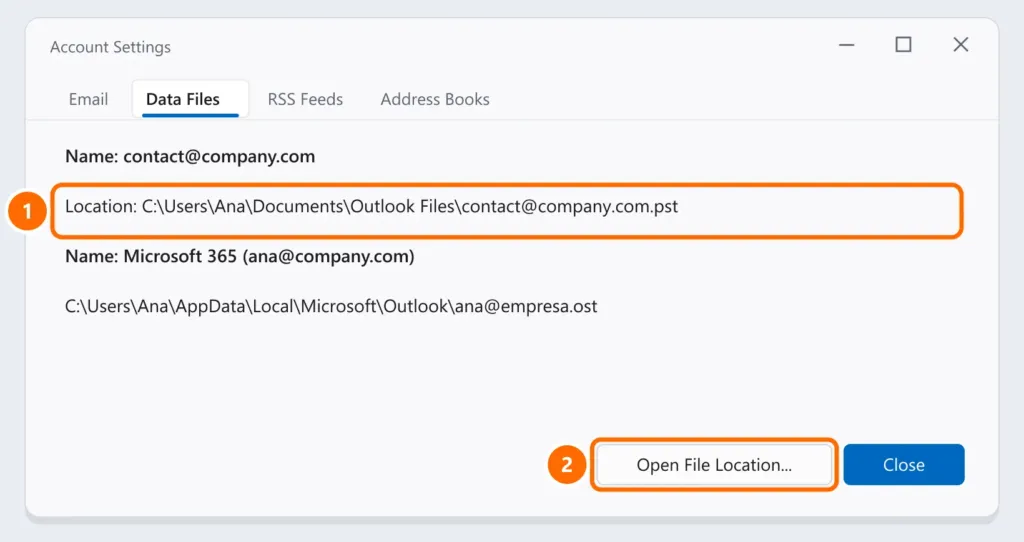
The default locations are:
- .pst:
Documents\Outlook Files - .ost:
%localappdata%\Microsoft\Outlook
A huge PST: compact it
A PST’s default limit is 50 GB, but files above a few gigabytes already slow Outlook down.
- Delete or move old email and empty that file’s Deleted Items folder.
- In Data Files, select the PST, click Settings and then Compact Now.
- If it’s still large, split it by year: create a new PST (New Items › More Items › Outlook Data File) and move old folders into it.
Back up and move to another computer
- Close Outlook and copy the
.pstfile to an external drive, USB drive or the cloud. - On the new computer, open Outlook and go to File › Open & Export › Open Outlook Data File, then select the file.
- To create a PST from any account’s mailbox (including Microsoft 365), use File › Open & Export › Import/Export › Export to a file › Outlook Data File (.pst).
Include the PST in your 3-2-1 backup routine.
A corrupted PST
If Outlook says the file has errors or won’t open it, use the SCANPST.EXE tool — the walkthrough is in Outlook won’t open (step 5). Make a copy of the file first.
FAQ
The PST file disappeared from Outlook.
It may have been moved or renamed. Search File Explorer for *.pst and open it again as in step 2 of “Back up and move to another computer”.
Can I open a PST without Outlook?
The official way is classic Outlook. Recent versions of new Outlook can open PST files too, with limited features.
The PST has a password and I forgot it.
There’s no official way to recover a PST password. That’s why Microsoft recommends not using PST passwords and protecting the computer with BitLocker instead.