Outlook pops up a window asking for your password — you type it, and it comes back a little later, again and again? It’s almost always an old saved credential or a security requirement from your email provider. Follow the steps in order.
In this article
Step 1: confirm the password is right
Sign in to your email’s webmail in a browser (for example, outlook.office.com for Microsoft 365). If the password doesn’t work there either, it changed or expired — reset it with your provider or IT first.
Step 2: clear saved credentials in Windows
Windows keeps the old password and keeps using it.
- Close Outlook.
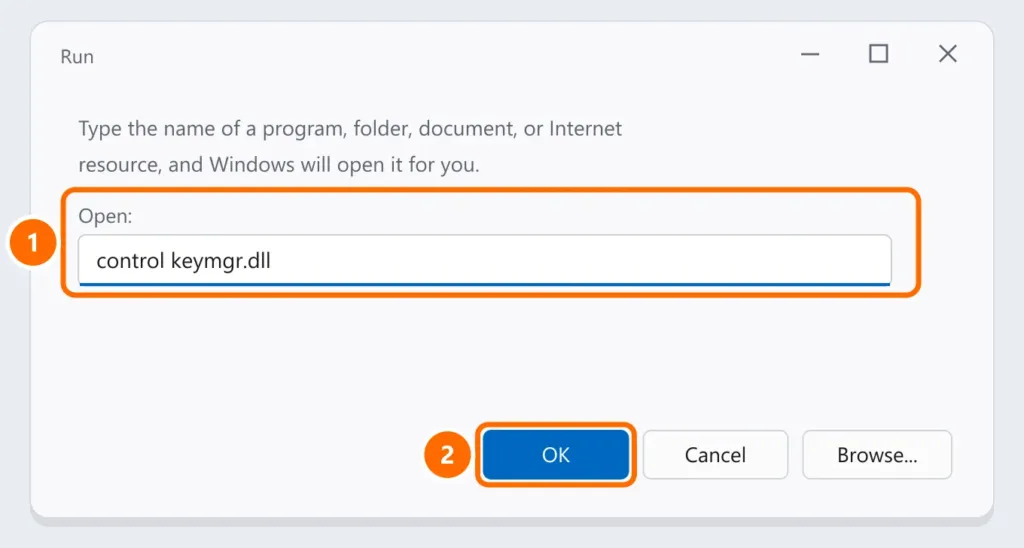
- Press Windows + R and run
control keymgr.dllto open Credential Manager. - Under Windows Credentials and Generic Credentials, remove entries that start with MicrosoftOffice, Outlook or your mail server’s address.
- Open Outlook and type the password once, checking Remember my credentials.
Step 3: Microsoft 365 — sign out of and back in to your Office account
- In Outlook, open File › Office Account.
- Under User Information, click Sign out, close all Office apps and open Outlook again.
- Sign in with your work account and complete two-step verification if asked.
Step 4: Gmail, Yahoo, iCloud and providers with two-step verification
These services don’t accept your regular password in apps like Outlook when two-step verification is on. Add the account again using the provider’s sign-in (when Outlook opens Google’s sign-in screen, for example), or create an app password in your account’s security settings and use it in Outlook. See how to turn on two-factor authentication.
Step 5: the setting that forces the prompt
For Exchange/Microsoft 365 accounts, make sure Outlook isn’t set to always ask for the password:
- File › Account Settings › Account Settings, select the account and click Change.
- More Settings › Security: uncheck Always prompt for logon credentials.
FAQ
The prompts started out of nowhere, without me changing anything.
Your company or provider may have changed the sign-in method, or your password expired. Do steps 2 and 3; at work, tell IT.
I’m getting sign-in approval requests I didn’t make.
Someone may be trying to get into your account. Don’t approve them, change your password and see email hacked: what to do.
Outlook won’t even open.
That’s a different problem — see Outlook won’t open.