First, try opening the PDF in another program: right-click the file › Open with › Microsoft Edge (Windows already reads PDFs with Edge). If it opens, the problem is your PDF reader; if it won’t open anywhere, the problem is the file.
In this article
1. The file came from the internet or email and is blocked
Windows marks downloaded files as “came from another computer”. Some readers refuse to open them or open them only in protected mode.
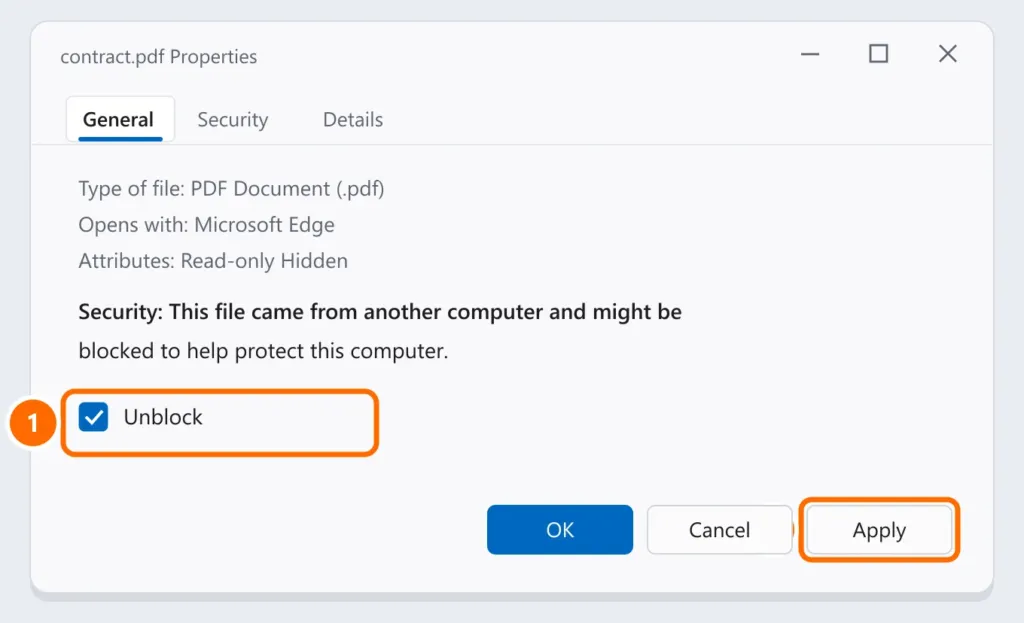
- Right-click the PDF › Properties.
- On the General tab, check Unblock and click Apply.
2. The default reader is wrong or broken
- Open Settings › Apps › Default apps.
- Type .pdf in the search box and click the current app.
- Choose Microsoft Edge or Adobe Acrobat Reader.
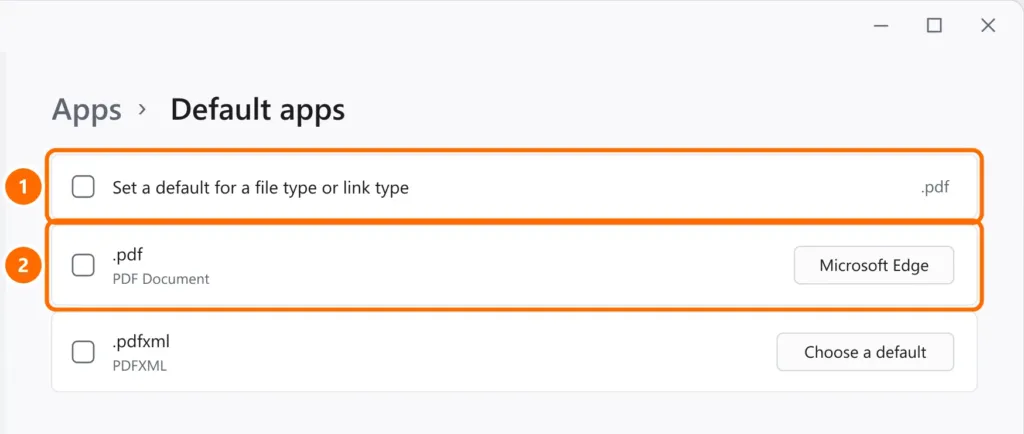
If Acrobat Reader shows an error or closes on its own, open Acrobat › Help › Repair Installation, or uninstall it and reinstall it from Adobe’s website.
3. Incomplete download
A half-downloaded PDF opens blank or shows an error. Download it again, preferably with another browser or directly on the computer (not on your phone). Large attachments on WhatsApp Web sometimes arrive incomplete: ask the person to send it again or by email.
4. “The file is damaged and could not be repaired”
This Acrobat message means the file is corrupted. What to try:
- Open it in Edge or in Chrome: sometimes they read what Acrobat rejects.
- Ask the sender for a new copy.
- If the PDF was yours and was in OneDrive or a network folder, restore a previous version: see recover deleted files.
On your phone
- Android: install a reader (Google Drive, Adobe Acrobat) and choose Open with that app. In WhatsApp, wait for the download to finish before tapping the file.
- iPhone: the Files app opens PDFs. In WhatsApp, tap the document and use Share › Save to Files.
- Without free space, the download fails: see phone storage full.
FAQ
The PDF asks for a password. How do I open it?
Protected PDFs only open with the password set by whoever created them, as with bills and pay stubs (the password is often part of your account number or date of birth). Don’t use sites that promise to “crack” the password: they may keep your personal documents.
The PDF opens, but some letters look strange.
The fonts are missing from the file. Open it in Edge or ask the sender to export the PDF again with the fonts embedded.