You click Shut down and Windows 11 restarts, hangs on “Shutting down”, or the screen goes dark while the lights and fan keep running? Follow the steps in order.
In this article
Step 1: finish updates
When an update is pending, the button shows Update and shut down — and Windows may restart once or more to finish. Open Settings › Windows Update, install anything pending, restart and then try shutting down.
Step 2: test a full shutdown
In PowerShell or Command Prompt, run:
shutdown /s /f /t 0/f forces open programs to close. If the computer shuts down normally with this command, a program was blocking shutdown — note which one appears on the “This app is preventing shutdown” screen.
Step 3: turn off fast startup
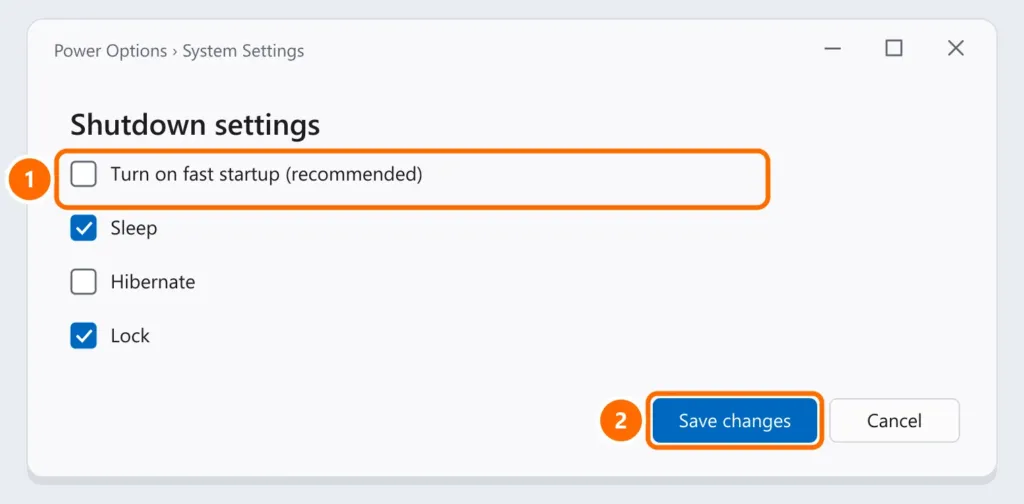
Fast startup makes Windows hibernate part of the system instead of shutting down completely, and on some computers it causes hangs and restarts.
- Press Windows + R, run
powercfg.cpland click Choose what the power buttons do. - Click Change settings that are currently unavailable.
- Uncheck Turn on fast startup (recommended) and click Save changes.
Step 4: restarts instead of shutting down
If Windows restarts on its own when shutting down, an error may be happening at shutdown. To see the error instead of restarting:
- Press Windows + R and run
sysdm.cpl. - On the Advanced tab, under Startup and Recovery, click Settings.
- Uncheck Automatically restart and click OK.
If a blue screen appears when shutting down, note the code and see blue screen on Windows 11.
Step 5: USB devices and drivers
- Unplug docks, hubs and USB peripherals and test — some “wake” the computer right after shutdown.
- Update the chipset and Intel Management Engine (or AMD equivalent) drivers from your computer maker’s website.
FAQ
Can I shut down by holding the power button?
Only as a last resort: forcing it off can corrupt open files and updates in progress.
The laptop shuts down, but the battery drains in my bag.
It may be sleeping instead of shutting down, or a device is waking it. Check steps 3 and 5 and use Shut down rather than just closing the lid.
It got slower to start after turning off fast startup.
That’s expected: fast startup speeds up booting. If shutdown works again, you can turn it back on after updating drivers and testing.