If you press one key and a different character appears, the keyboard is almost certainly not broken: Windows is using another layout (for example, United Kingdom or US-International instead of US). This usually happens because of a shortcut pressed by accident.
In this article
Quick fix
- Look at the right side of the taskbar, near the clock: if you see UK, INTL or another language code instead of ENG US, the layout changed.
- Press Windows + Space and choose US.
Keep only the right layout (so it doesn’t happen again)
- Open Settings › Time & language › Language & region.
- Next to English (United States), click the three dots › Language options.
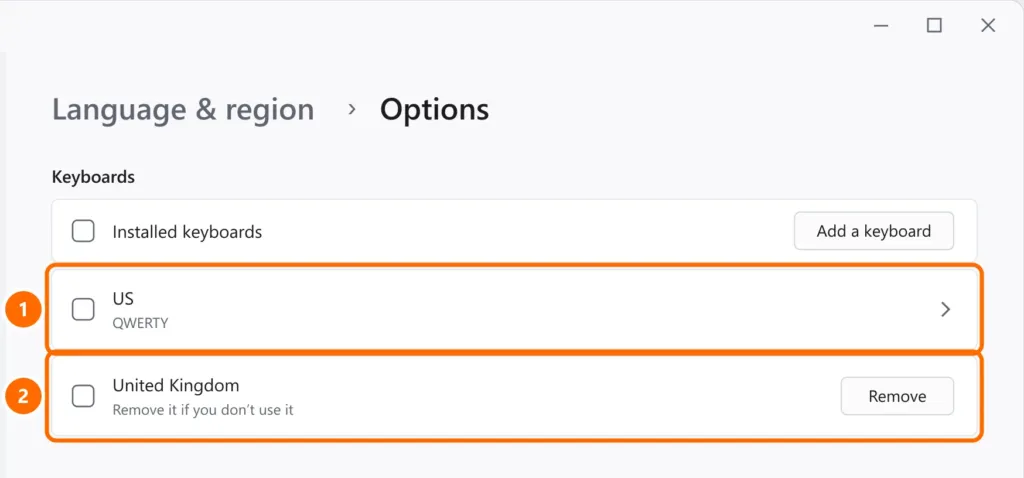
- Under Keyboards, keep US, the standard QWERTY layout for keyboards sold in the United States.
- Remove any other layouts you don’t use, such as United Kingdom or US-International.
How to tell which keyboard you have
- US: the “ symbol shares a key with ‘ next to Enter, @ is on Shift + 2 and the Enter key is a single wide row.
- United Kingdom: @ is next to Enter, “ is on Shift + 2, there’s a £ on Shift + 3 and the Enter key is tall. If your keyboard looks like the US one but types like this, the UK layout is active.
- US-International: same keys as US, but ‘ and “ wait for the next key to add accents (‘ + e gives é). If quotes and apostrophes only appear after you press another key, this layout is active.
Letters turned into numbers (laptop)
On some laptops without a numeric keypad, Num Lock turns the letters U, I, O, J, K, L into numbers. Press Num Lock (sometimes Fn + Num Lock or Fn + F11) to turn it off.
Other symptoms
- A key that “repeats” or is slow to respond: Filter Keys may be turned on. See laptop keyboard not working.
- Only some keys don’t work: it may be dirt or liquid; test with a USB keyboard to confirm.
- Your password is “incorrect” on the sign-in screen: check the layout in the bottom-right corner of the sign-in screen before typing.
FAQ
My keyboard layout keeps changing on its own.
There are almost always two layouts or two languages installed, and someone presses Alt + Shift or Windows + Space. Remove the extra layouts as shown above.
How do I type accents on a US keyboard?
With the US-International layout, type ‘ (apostrophe) and then the letter, such as e for é. To type a plain apostrophe, press ‘ and then Space.