The “Activate Windows” watermark appeared in the corner of your screen, or a notice says Windows isn’t activated? In most cases the license exists, but Windows couldn’t confirm it — for example, after a motherboard change or reinstalling the wrong edition.
In this article
What happens when Windows isn’t activated
- A watermark appears, along with periodic reminders to activate.
- Personalization options (wallpaper, colors, themes) are locked.
- Everything else keeps working, including security updates.
In short: it’s not urgent, but it’s worth fixing — and using a valid license.
Step 1: check the state and error code
Open Settings › System › Activation and expand Activation state.
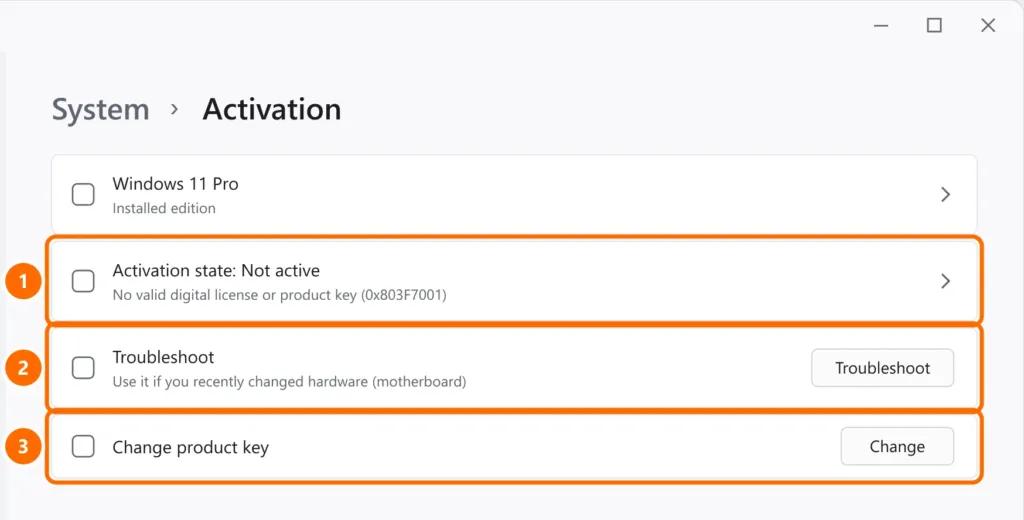
| Code | What it means | What to do |
|---|---|---|
| 0x803F7001 | No digital license or key found for this hardware | Step 2 (hardware changed) or step 3 (key) |
| 0xC004F213 | No product key found on the device | Step 2 or step 3 |
| 0xC004C003 | The key was blocked by the activation servers | Use a valid key from an authorized retailer |
| Different edition | A Home key with Windows Pro installed (or vice versa) | Install the edition that matches the license |
Step 2: changed the motherboard? Use the troubleshooter
The digital license is tied to the hardware. If it’s linked to your Microsoft account, you can transfer it:
- Sign in to Windows with the same Microsoft account used before the change.
- Under Activation, click Troubleshoot.
- Choose I changed hardware on this device recently, sign in and select the computer from the list.
Step 3: enter the product key
If you have a 25-character key (box, purchase email or sticker), under Activation click Change product key and enter it. The computer needs an internet connection.
Step 4: company computers
At companies, Windows is usually activated by a server (KMS) or through a Microsoft 365 / Windows Enterprise subscription. If the notice appears on a work computer, contact IT — the computer usually needs to reach the company network (or the VPN).
FAQ
Does an unactivated Windows run slow or shut down?
No. Activation doesn’t affect performance. If your PC is slow or shutting down, something else is going on — see high CPU usage.
I reinstalled Windows. Do I need the key again?
Usually not: with the same edition and hardware, Windows reactivates automatically from the digital license once it’s online.
Where do I find my computer’s key?
Factory computers have the key stored in the BIOS and activate on their own. Licenses bought separately come in the purchase email or box.