The company VPN worked yesterday and today it won’t connect — at home, on mobile data or at a hotel? The most common causes are a network blocking VPNs, credentials or two-factor authentication, a wrong date and time, and an outdated VPN client.
In this article
Step 1: confirm your internet works
Open a few websites without the VPN. If your connection is unstable, see internet keeps dropping on your PC first.
Step 2: try another network
Hotel, airport, coworking and some corporate Wi-Fi networks block the ports VPNs use. Test using your phone’s hotspot (4G/5G):
- Connects on mobile data but not on Wi-Fi: the network is blocking the VPN.
- Doesn’t connect on either: the problem is your credentials, the client or the server.
Step 3: credentials, MFA, date and time
- Check your username and password — many VPNs use your corporate email password, which may have expired.
- Watch for the two-factor authentication prompt on your phone: if it isn’t approved in time, the connection fails.
- Make sure your computer’s date and time are correct: certificates reject a wrong clock.
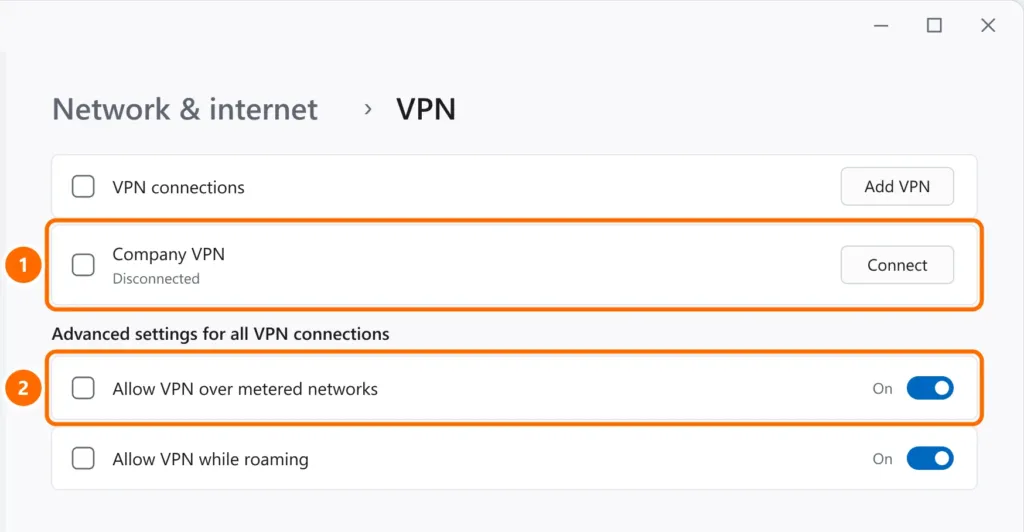
Step 4: Windows built-in VPN
- Open Settings › Network & internet › VPN.
- Connect from the list and, on mobile hotspots or 4G/5G routers, keep Allow VPN over metered networks on.
Step 5: FortiClient
| Message | Likely cause | What to do |
|---|---|---|
| “The VPN server may be unreachable” (-14) | Wrong address or port, unstable internet or a blocking network | Check the server and port with IT and try another network |
| “Credential or SSLVPN configuration is wrong” (-7200) | Wrong username, password or profile settings | Re-enter your credentials and ask IT to check the profile |
| Certificate warning | Untrusted server certificate or wrong clock | Check the date and time; accept only if IT confirms |
- Update FortiClient to the version your company specifies.
- Disconnect other VPNs and temporarily turn off other firewalls or antivirus to test.
Step 6: contact IT with the right details
Send support the error code or message, the network you’re on (home, mobile data, hotel), the time of the attempt and your VPN client version. With that, IT can check the server and access logs.
FAQ
The VPN connects but company systems won’t open.
It may be DNS or routing. Disconnect and reconnect, and tell IT which addresses don’t open.
The VPN drops after a few minutes.
Usually unstable Wi-Fi or network adapter power saving. See step 3 of the internet keeps dropping guide.
Can I use a free VPN to reach the company network?
No. The company VPN is specifically for accessing the corporate network; third-party VPNs don’t replace it and may break security policies.