Your files stopped opening, got a strange extension and a file or screen appeared demanding payment to get them back? That’s ransomware — malware that encrypts your data and demands a ransom. The first few minutes make a difference.
In this article
In the first few minutes
- Isolate the computer: unplug the network cable and turn off Wi-Fi. That stops the attack from spreading to shared folders, NAS devices and other computers.
- Disconnect external drives and USB drives that are plugged in.
- Don’t shut down or reformat the computer before IT or a specialist has assessed it: information in memory and on disk helps understand the attack and sometimes recover the data.
- Alert IT or your support provider immediately. At a company, the sooner everyone knows, the fewer machines are affected.
- Take a photo of the ransom message and note the file extension.
Should you pay the ransom?
Security agencies recommend not paying: there’s no guarantee you’ll get the key, the money funds new attacks and the business may be targeted again. Before any decision, consult specialists and your legal team.
How to recover your files
- Offline or immutable backup: the most reliable way. Before restoring, make sure the computer has been cleaned (usually by reinstalling the operating system), so the backup doesn’t get encrypted too.
- OneDrive/SharePoint version history: OneDrive lets you restore an entire folder to a date before the attack (Settings › Restore your OneDrive, on Microsoft 365 accounts).
- Free decryptors: the No More Ransom project (
nomoreransom.org), run by police agencies and security companies, has tools for some ransomware families. Identify yours by the extension or the message.
How to protect yourself
- 3-2-1 backup with one copy disconnected or immutable — see the 3-2-1 backup rule.
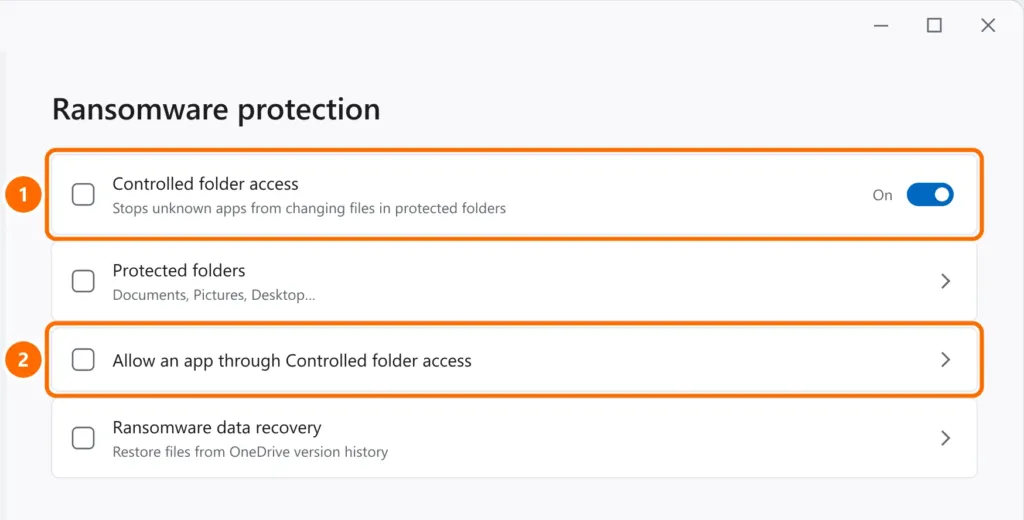
- Controlled folder access in Windows: stops unknown programs from changing Documents, Pictures and Desktop.
- Keep Windows, browsers and programs updated.
- Two-step verification on email, VPN and remote access — see how to turn on two-factor authentication.
- Never expose Remote Desktop (port 3389) to the internet — it’s one of the main ways in. Use a VPN.
- Train your team to recognize phishing, the most common starting point for attacks.
FAQ
The antivirus removed the ransomware. Will my files come back?
No. Removing the malware stops further damage, but files already encrypted stay that way. Restore from backup or with a decryptor, if one exists.
Can ransomware reach my backup?
Yes, if the backup is always connected (a plugged-in drive, a network folder). That’s why at least one copy should stay disconnected or in immutable storage.
Are home computers targets too?
Yes. Personal photos and documents get held hostage too. The same protections apply.