You click Chrome and nothing happens, the window opens and closes, or the browser got so slow that pages take ages to load? Follow the steps in order: the first ones fix most cases.
In this article
Step 1: end a stuck Chrome
Chrome often won’t open because it’s already open — frozen in the background.
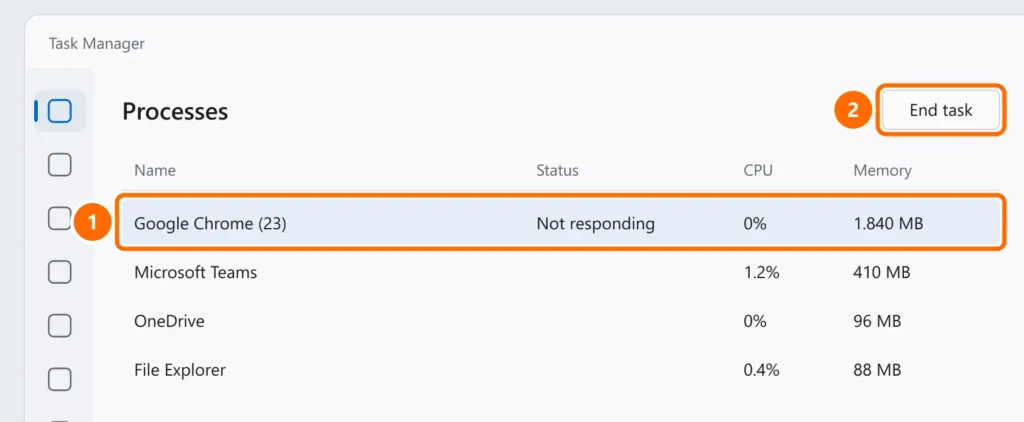
- Press Ctrl + Shift + Esc to open Task Manager.
- In Processes, select Google Chrome and click End task.
- Open Chrome again. If that doesn’t help, restart the computer.
Step 2: test without extensions
- Press Ctrl + Shift + N to open an Incognito window (extensions are off there).
- If Chrome is fast in Incognito, an extension is the problem. Type
chrome://extensionsin the address bar and turn them all off; then turn them back on one at a time until you find the culprit.
Step 3: clear the cache
Press Ctrl + Shift + Del, choose All time, check Cached images and files and Cookies and other site data, and click Delete data. Cookies sign you out of sites — have your passwords handy.
Step 4: hardware acceleration
Black or flickering screens and graphics freezes often come from hardware acceleration.
- Type
chrome://settings/systemin the address bar. - Turn off Use graphics acceleration when available and click Relaunch.
Step 5: update and reset
- Open
chrome://settings/helpto update Chrome. - If it continues, reset at
chrome://settings/reset› Restore settings to their original defaults. Bookmarks, history and saved passwords are kept; extensions are turned off.
Step 6: reinstall
If Chrome won’t open at all, uninstall it under Settings › Apps › Installed apps, restart and download the latest version from google.com/chrome. With sync turned on in your Google account, bookmarks and passwords come back afterwards.
FAQ
Chrome opens, but no site loads.
If other browsers don’t load pages either, the problem is your connection or DNS — see DNS server not responding.
Chrome uses a lot of memory.
Every tab and extension is a separate process. Close tabs you’re not using and turn on Memory Saver at chrome://settings/performance.
The whole computer slows down with Chrome open.
Also see high CPU usage with nothing open and Windows 11 slow and freezing.