You’re talking, but nobody can hear you — in Teams, Google Meet, Zoom or Discord. Most of the time Windows is blocking microphone access through privacy settings, or the app is using the wrong microphone.
In this article
Step 1: allow the microphone in Windows privacy
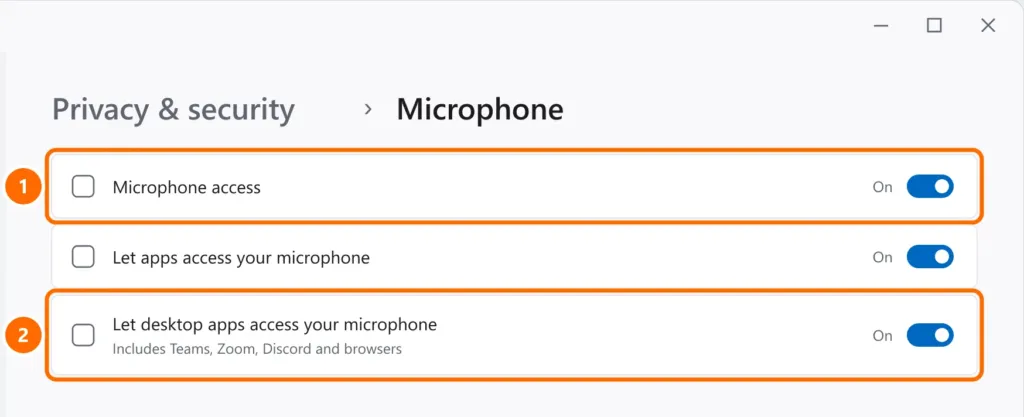
- Open Settings › Privacy & security › Microphone.
- Turn on Microphone access, Let apps access your microphone and Let desktop apps access your microphone.
Step 2: choose and test the right microphone
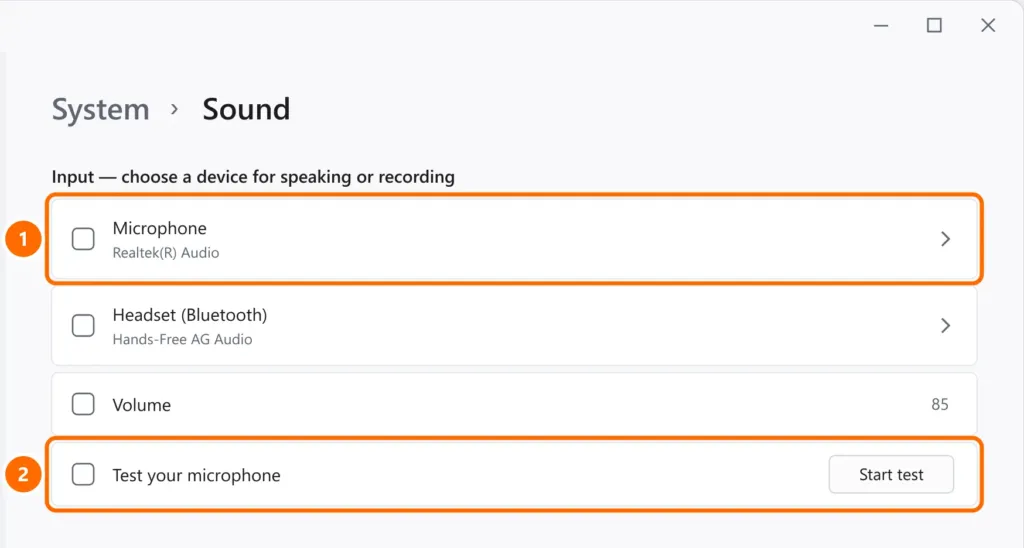
- Open Settings › System › Sound and scroll to Input.
- Select the microphone you’re using and click Start test.
Step 3: check the app and the browser
- Teams: under Settings › Devices, choose the microphone and make a test call.
- Google Meet and other sites: click the padlock icon next to the address and allow Microphone.
- Zoom and Discord: in each app’s audio settings, select the right input device instead of “Default”.
- Close other apps that might be using the microphone at the same time.
Step 4: check the mute button
Many laptops and headsets have a microphone mute key (with a light), and wired headsets often have an inline control. Also check the input level in the microphone’s properties.
Step 5: driver and exclusive mode
- In Device Manager, under Audio inputs and outputs, update or roll back the microphone driver.
- An app can “grab” the microphone. In Control Panel › Sound › Recording, open the microphone’s properties and, on the Advanced tab, uncheck Allow applications to take exclusive control of this device.
FAQ
The microphone works in one app but not another. Why?
Each app picks its own input device. Select the right microphone in the failing app’s settings and check desktop app access (step 1).
My Bluetooth headset microphone doesn’t work.
Remove and pair the headset again and, under sound input, choose the “Headset” device (call profile). See also Bluetooth not showing up on Windows 11.
The microphone stopped after an update.
Roll back the audio driver in Device Manager and check that the update didn’t turn off the privacy permissions.