Most laptops ship with Windows 11 Home. Pro costs more and is only worth it if you’ll use the extra features. For gaming, browsing, Office and home use, performance is exactly the same in both editions.
In this article
Quick summary
| Feature | Home | Pro |
|---|---|---|
| Device encryption (when the hardware supports it) | Yes | Yes |
| Full BitLocker (including USB drives and external drives with BitLocker To Go) | No | Yes |
| Remote Desktop — accept incoming connections (be accessed) | No | Yes |
| Remote Desktop — connect to another PC | Yes | Yes |
| Hyper-V and Windows Sandbox | No | Yes |
| Group Policy Editor (gpedit.msc) | No | Yes |
| Join a company domain | No | Yes |
| Join Microsoft Entra ID and manage with Intune | No | Yes |
| Maximum RAM | 128 GB | 2 TB |
| Games, Office, browser, Windows Hello, Windows Security | Yes | Yes |
Who needs Pro
- Businesses, even small ones: to join the PC to a domain or to Microsoft Entra ID, apply security policies and manage it with Intune (included in Microsoft 365 Business Premium).
- People who access their PC remotely with Windows Remote Desktop. On Home, the alternative is third-party remote access software. See also Remote Desktop not connecting.
- People who need full BitLocker, with management options and encryption of USB drives and external drives. See BitLocker recovery key.
- IT pros and developers who use virtual machines (Hyper-V) or Sandbox to test suspicious programs.
Who can stay on Home
- Home and school use, gaming, browser-based work, Office and video calls.
- Freelancers who don’t need built-in remote access or central management.
How to check which edition your PC has
Open Settings › System › About and look at the Edition line under Windows specifications.
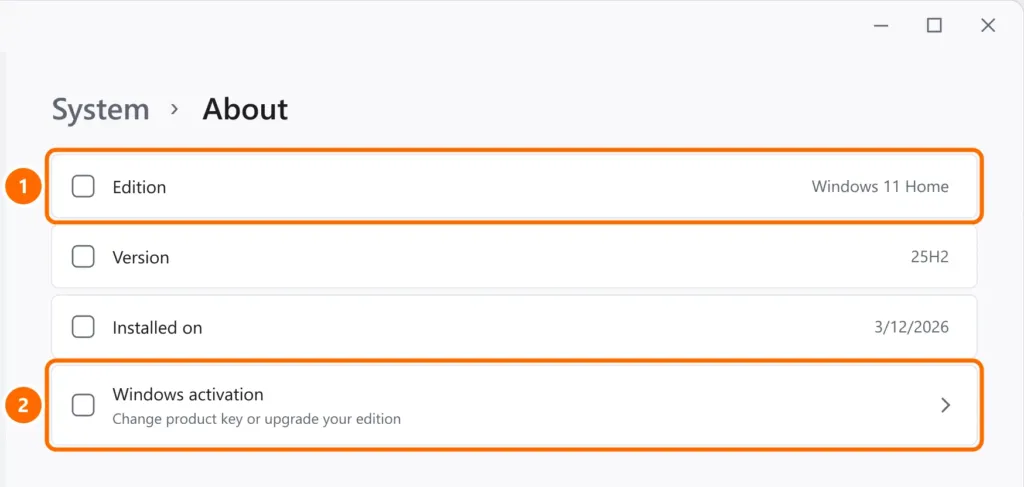
How to upgrade from Home to Pro
- Open Settings › System › Activation.
- Under Upgrade your edition of Windows, choose Open Store to buy the upgrade, or Change product key if you already have a Pro key.
- The PC restarts and keeps your files and programs.
FAQ
Is Windows 11 Pro faster than Home?
No. The core of the system is the same. The difference is in the management and security features.
Can I go back from Pro to Home?
There’s no simple path: you have to reinstall Windows with Home. So only upgrade if you’ll use the Pro features.
I bought a PC for my business and it has Home. Now what?
You can upgrade to Pro through Activation, without wiping the PC. For several computers, talk to a Microsoft reseller about business licensing.